Header
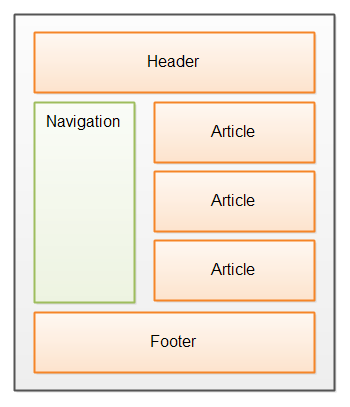
The <header> element represents the introductory or navigational content at the top of a webpage or a specific section within a webpage.
Example:
<header>
    <h1>Welcome to My Website</h1>
    <nav>
       <a href="/">Home</a>
       <a href="/about">About</a>
       <a href="/contact">Contact</a>
    </nav>
</header>
In this example, the <header> element contains the website's main heading (<h1>) and a navigation menu (<nav>) providing links to different sections of the website.
Key points
- A page can have multiple headers
- Headers are not limited to the top of the page
- Often paired with <nav>
Navigation
The <nav> element represents a section of a webpage that contains navigation links allowing users to navigate through different areas or pages of a website.
Example:
<nav>
    <a href="/">Home</a>
    <a href="/about">About</a>
    <a href="/contact">Contact</a>
</nav>
In this example, the <nav> element contains links to the home, about, and contact pages of a website.
When to use <nav>
- Main site navigation
- Footer navigation
- Table of contents
Avoid using <nav> for every group of links — only for major navigation blocks.
Main
The <main> element represents the main content of a webpage. It should contain unique content that is directly related to the purpose or central topic of the webpage.
Example:
<main>
    <h1>About Us</h1>
    <p>
       Welcome to our website! We are a company dedicated to
       providing high-quality products and services.
    </p>
</main>
In this example, the <main> element contains information about the company, serving as the main content of the webpage.
Important rules
- Only one <main> per page
- Must not be inside <header>, <nav>, <footer>, or <aside>
- Contains content unique to the page
Article
The <article> element represents a self-contained composition that can be independently distributed or reused. It can represent blog posts, news articles, forum posts, and more.
Example:
<article>
    <h2>10 Tips for Successful Web Development</h2>
    <p>
         Here are ten essential tips to improve your web development
         skills and create successful projects.
   </p>
</article>
In this example, the <article> element contains a blog post or article with its title and content.
Typical use cases
- Blog posts
- News articles
- Forum posts
- Product cards
If content could be shared or reused independently, <article> is usually the right choice.
Section
The <section> element represents a standalone section within a document or a thematic grouping of content. It helps organize and structure the content of a webpage.
Example:
<section>
    <h2>Our Services</h2>
    <p>
         We offer a wide range of services, including web design,
         development, and digital marketing.
    </p>
</section>
In this example, the <section> element represents a section dedicated to describing the services offered by a company.
Rule of thumb
- Sections should usually have a heading
- Use <section> when content has a clear topic
- Don’t use it just for styling
Aside
The <aside> element represents content that is related to the main content of a webpage. It can contain sidebars, pull quotes, advertisements, or other supporting information.
Example:
<aside>
    <h3>Related Articles</h3>
    <ul>
       <li><a href="/article1">Article 1</a></li>
       <li><a href="/article2">Article 2</a></li>
       <li><a href="/article3">Article 3</a></li>
    </ul>
</aside>
In this example, the <aside> element contains a list of related articles, providing additional information to the main content.
Common uses
- Sidebars
- Related links
- Ads
- Pull quotes
Footer
The <footer> element represents the footer or the bottom section of a webpage. It typically contains copyright information, links to legal documents, and contact details.
Example:
<footer>
<p>© 2023 My Website. All rights reserved.</p>
<nav>
<a href="/privacy">Privacy Policy</a>
<a href="/terms">Terms of Service</a>
</nav>
</footer>
In this example, the <footer> element contains copyright information and links to the privacy policy and terms of service pages.
Footer typically contains
- Copyright information
- Legal links
- Secondary navigation
- Author or contact info
A page can have multiple footers, especially inside articles.
Figure and Figcaption
The <figure> element is used to encapsulate media such as an image, diagram, or chart along with a caption. The <figcaption> element is used within the <figure> element to provide a caption or legend for the content.
Example:
<figure style="margin: 0">
   <img src="https://placehold.co/600x400" alt="A placeholder image"/>
   <figcaption>A placeholder image</figcaption>
</figure>
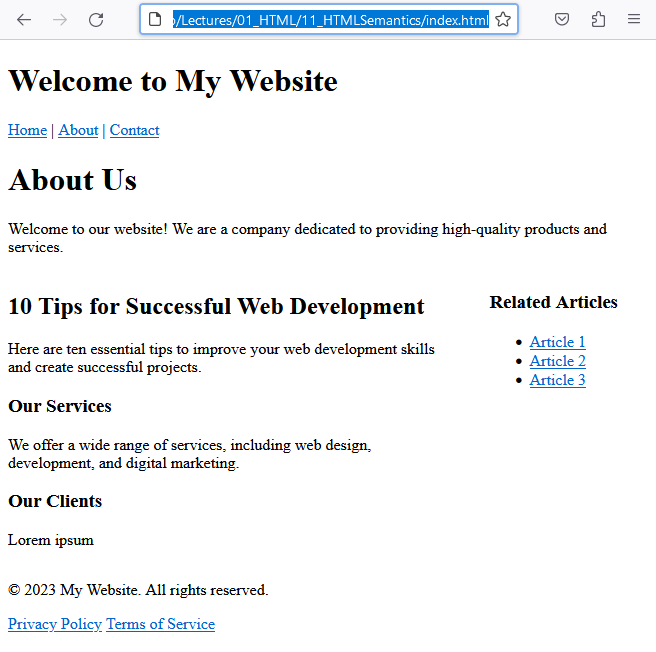
Now, if we put all of this together to form an actual HTML page and add some CSS, we could get something like this:
<!DOCTYPE html>
<html lang="en">
<head>
<meta charset="utf-8" />
<title></title>
<style>
main {
overflow: hidden;
}
article {
width:70%;
float: left;
}
aside {
width:25%;
float: right;
}
</style>
</head>
<body>
<header>
<h1>Welcome to My Website</h1>
<nav>
<a href="/">Home</a> |
<a href="/about">About</a> |
<a href="/contact">Contact</a>
</nav>
</header>
<main>
<h1>About Us</h1>
<p>Welcome to our website! We are a company dedicated to providing high-quality products and services.</p>
<article>
<h2>10 Tips for Successful Web Development</h2>
<p>Here are ten essential tips to improve your web development skills and create successful projects.</p>
<section>
<h3>Our Services</h3>
<p>We offer a wide range of services, including web design, development, and digital marketing.</p>
</section>
<section>
<h3>Our Clients</h3>
<p>Lorem ipsum</p>
</section>
</article>
<aside>
<h3>Related Articles</h3>
<ul>
<li><a href="/article1">Article 1</a></li>
<li><a href="/article2">Article 2</a></li>
<li><a href="/article3">Article 3</a></li>
</ul>
</aside>
</main>
<footer>
<p>© 2023 My Website. All rights reserved.</p>
<nav>
<a href="/privacy">Privacy Policy</a>
<a href="/terms">Terms of Service</a>
</nav>
</footer>
</body>
</html>
Why use <figure>
- Groups media with its description
- Improves accessibility
- Adds semantic meaning
Putting it all Together
Now, if we put all of this together to form an actual HTML page and add some CSS, we could get something like this:
<!DOCTYPE html>
<html lang="en">
<head>
<meta charset="utf-8" />
<title></title>
<style>
main {
overflow: hidden;
}
article {
width:70%;
float: left;
}
aside {
width:25%;
float: right;
}
</style>
</head>
<body>
<header>
<h1>Welcome to My Website</h1>
<nav>
<a href="/">Home</a> |
<a href="/about">About</a> |
<a href="/contact">Contact</a>
</nav>
</header>
<main>
<h1>About Us</h1>
<p>Welcome to our website! We are a company dedicated to providing high-quality products and services.</p>
<article>
<h2>10 Tips for Successful Web Development</h2>
<p>Here are ten essential tips to improve your web development skills and create successful projects.</p>
<section>
<h3>Our Services</h3>
<p>We offer a wide range of services, including web design, development, and digital marketing.</p>
</section>
<section>
<h3>Our Clients</h3>
<p>Lorem ipsum</p>
</section>
</article>
<aside>
<h3>Related Articles</h3>
<ul>
<li><a href="/article1">Article 1</a></li>
<li><a href="/article2">Article 2</a></li>
<li><a href="/article3">Article 3</a></li>
</ul>
</aside>
</main>
<footer>
<p>© 2023 My Website. All rights reserved.</p>
<nav>
<a href="/privacy">Privacy Policy</a>
<a href="/terms">Terms of Service</a>
</nav>
</footer>
</body>
</html>
Why Semantic HTML Matters (SEO + Accessibility)
Using semantic elements:
- Helps search engines understand page structure
- Improves screen reader navigation
- Makes code easier to read and maintain
- Aligns with modern HTML best practices
Semantic HTML is not optional — it’s a core skill for professional web development.
Using semantic elements in HTML 5 enhances the structure, organization, and accessibility of web pages. By appropriately applying these elements, you provide meaning and context to the content, aiding both humans and assistive technologies in understanding the webpage's structure.
Conclusion
HTML5 semantic elements give structure and meaning to web pages. By using them correctly, you build pages that are more accessible, more maintainable, and more SEO-friendly.