JQuery CSS
JQuery supports almost all the selectors included in the CSS styling language from the first to the third specification. By applying jQuery, it is possible to upgrade web applications without worrying about browser support.
Desired Outcomes:
- Apply CSS to elements using jQuery
- Read CSS property values from elements
Most jQuery CSS methods do not modify the content of the jQuery object and are used to apply CSS styles to DOM elements.
As you have already seen in previous lessons of the manual, it is very easy to apply CSS styles using the jQuery css() method.
The syntax for the css() method is as follows:
$(selector).css(property, value);
Within the css() method, the name of the CSS property and the value of the property are passed separated by a comma. The property is passed as a String data type, while the value can be a string or a number.
Example:
<!DOCTYPE html>
<html lang="en">
  <head>
    <meta charset="utf-8" />
    <title>jQuery CSS</title>
    <script type="text/javascript"
        src="http://ajax.googleapis.com/ajax/libs/jquery/3.7.0/jquery.min.js">
    </script>
    <script type="text/javascript">
      $(document).ready(function() {
         $("p").css("color", "red");
      });
    </script>
  </head>
  <body>
    <div>
      <p>Paragraph text</p>
    </div>
  </body>
</html>
In the previous example, the color property is applied to the paragraph text.
In the jQuery css() method, it is also possible to pass multiple properties separated by commas.
$(selector).css({
  'property1': 'value',
  'property2': 'value',
  'propertyN': 'value'
});
In the following example, several CSS rules are applied to all <li> elements. When setting a property that requires a certain unit or number, if the unit is not explicitly written, it will automatically be converted to pixels.
<!DOCTYPE html>
<html lang="en">
  <head>
    <meta charset="utf-8" />
    <title>jQuery CSS</title>
    <script
        src="http://ajax.googleapis.com/ajax/libs/jquery/3.7.0/jquery.min.js">
    </script>
    <script>
      $(document).ready(function () {
        $("li").css({
          float: "left",
          width: 16.66666 + "%",
          height: 20,
          color: "#FFFFFF",
          "background-color": "#000000",
        });
      });
    </script>
  </head>
  <body>
    <div>
      <ul>
        <li>list item 1</li>
        <li>list item 2</li>
        <li>list item 3</li>
        <li>list item 4</li>
        <li>list item 5</li>
        <li>list item 6</li>
      </ul>
    </div>
  </body>
</html>
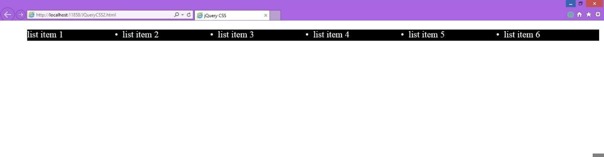
The width is set in percentage so that the % sign is concatenated with the value of the property, while the height is defined without a unit based on which it will be in pixels.
In addition to being able to set the width and height using the css() method, for example, jQuery contains its own methods for setting and retrieving dimensions and retrieving the position of an element.
The mentioned methods and their purposes are found in the following table.
|
Method Name |
Explanation |
|
css( property ) |
Retrieves the CSS property of the first mentioned element. |
|
css( property, value ) |
Sets the CSS property of all mentioned elements to a certain value. |
|
css( { properties } ) |
Sets multiple CSS properties. It creates an object with properties and values as key/value pairs. |
|
height() |
Retrieves the height of the element. |
|
height( val ) |
Sets the height of the element. |
|
innerHeight() |
Retrieves the height of the element including padding but without border. |
|
outerHeight( true | false ) |
Get the current computed outer height (including padding, border, and optionally margin if you pass true to the function) for the first element in the set of matched elements. |
|
width() |
Retrieves the width of the element. |
|
width( val ) |
Sets the width of the element. |
|
innerWidth() |
Retrieves the width of the element including padding but without border. |
|
outerWidth( true | false) |
Get the current computed outer width (including padding, border, and optionally margin if you pass true to the function) for the first element in the set of matched elements. |
|
position() |
Retrieves the top and left position of the element depending on the position of the parent element. |
|
offset() |
Retrieves the top and left position of the element depending on the document. |
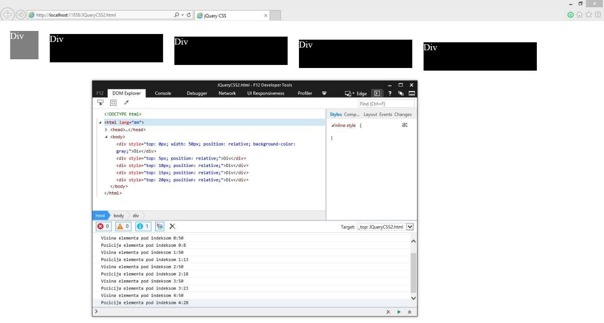
The following example has the following specifics:
- The width() method is applied to the first <div> element using the .first() method.
- The height and position values of the elements are retrieved using the height() and position() methods.
- The values are added using the .css() method within the jQuery each( function ) function.
- The values are printed using the console.log() function within the jQuery each( function ) function.
<!DOCTYPE html>
<html lang="en">
  <head>
    <meta charset="utf-8" />
    <title>jQuery CSS</title>
    <script
        src="http://ajax.googleapis.com/ajax/libs/jquery/3.7.0/jquery.min.js">
    </script>
    <script>
      $(document).ready(function () {
        var div = $('div');
        var topPosition = 5;
        $("div:first").width(50);
        $("div:first").css("background-color", "gray");

        div.each(function (index) {
          $(this).css({
          'position': 'relative',
          'top': (topPosition * index) + 'px' });

           console.log("Height of element with index " +
              index + ":" + $(this).height());


           console.log("Position of element with index " +
              index + ":" + $(this).position().top);
        })
      });
    </script>
    <style>
      div {
           float: left;
           width: 200px;
           height: 50px;
           margin: 10px;
           background: #000000;
           color: #FFFFFF;
      }
    </style>
  </head>
  <body>
    <div>Div</div>
    <div>Div</div>
    <div>Div</div>
    <div>Div</div>
    <div>Div</div>
  </body>
</html>
Updated on:
Part of our complete: JQuery guide
Want exercises and real projects for this lesson? Get the full course.