Exercise: Person Records Example
In the following example, people are entered into fields using jQuery and are printed on button click.
HTML
<!DOCTYPE html>
<html lang="en">
<head>
<meta charset="utf-8" />
<title>JQuery - Person Entry</title>
<link rel="stylesheet" href="./styles/styles.css" />
<script
type="text/javascript"
src="http://ajax.googleapis.com/ajax/libs/jquery/3.7.0/jquery.min.js"
></script>
</head>
<body>
<fieldset>
<legend>
<button type="button" id="personEntryToggle">Person Entry</button>
</legend>
<div id="entry">
<table cellpadding="5" cellspacing="0" class="table">
<tr>
<td class="column1">First Name:</td>
<td><input type="text" id="firstName" /></td>
</tr>
<tr>
<td class="column1">Last Name:</td>
<td><input type="text" id="lastName" /></td>
</tr>
<tr>
<td class="column1">Address:</td>
<td><input type="text" id="address" /></td>
</tr>
<tr>
<td class="column1">City:</td>
<td><input type="text" id="city" /></td>
</tr>
<tr>
<td class="column1"> </td>
<td>
<input type="button" value="Add Person" id="addPersonBtn" />
</td>
</tr>
<tr>
<td colspan="2"><p id="info"></p></td>
</tr>
</table>
</div>
</fieldset>
<fieldset>
<legend>
<button type="button" id="reviewToggle">Person Review</button>
</legend>
<div id="review">
<table cellpadding="5" cellspacing="0" class="table">
<tr>
<td class="column1">Select person:</td>
<td>
<select id="people"></select>
</td>
</tr>
<tr>
<td class="column1"> </td>
<td><p id="displayAddress"></p></td>
</tr>
<tr>
<td class="column1"> </td>
<td> </td>
</tr>
</table>
</div>
</fieldset>
<script src="./scripts/script.js"></script>
</body>
</html>
CSS - styles.css
body,
fieldset legend {
  font: 16px "Segoe UI", Verdana;
}
#txtInfo {
  color: red;
}
input,
textarea,
select, button {
  border: 1px solid #e2e2e2;
  color: #333;
  font-size: 1.2em;
  padding: 5px;
  width: 300px;
  font-weight: bold;
}
input[type="button"], button {
  width: 312px;
  cursor: pointer;
}
fieldset {
  padding: 20px;
  border: 1px solid #ccc;
  margin-bottom: 16px;
}
fieldset legend,
p {
  font-weight: bold;
}
p {
  font-size: 1.5em;
  color: #333;
}
.table {
  width: 800px;
}
.column1 {
  width: 120px;
  text-align: right;
}
JavaScript - script.js
$(document).ready(function () {
  function Person(firstName, lastName, address, city) {
    this.firstName = firstName;
    this.lastName = lastName;
    this.address = address;
    this.city = city;
  }

  // Initially we fill the peopleArray with 2 random persons
  var peopleArray = new Array(
    new Person("John", "Doe", "Dresden Street 1", "Dresden"),
    new Person("Jane", "Doe", "Berlin Street 2", "Berlin")
  );

  var showHideSpeed = 1000;

  // Cache all needed elements for easy access
  var firstNameField = $("#firstName");
  var lastNameField = $("#lastName");
  var addressField = $("#address");
  var cityField = $("#city");
  var peopleDropdown = $("#people");
  var displayAddress = $("#displayAddress");
  var infoField = $("#info");
  var entryField = $("#entry");
  var reviewField = $("#review");

  var personEntryBtn = $("#personEntryToggle");
  var reviewBtn = $("#reviewToggle");
  var addPersonBtn = $("#addPersonBtn");

  // When DOM is loaded
  firstNameField.focus();
  showPerson();

  /* Event Subscriptions */
  // Subscribe to events
  personEntryBtn.click(personEntryToggle);
  reviewBtn.click(reviewToggle);
  addPersonBtn.click(addPerson);
  peopleDropdown.change(ddlOnChange);
  $(document).keypress(onEnterPress);

  /* Event Handler Functions */
  // Handles opening/closing of person entry fieldset
  var formShown = true;
  function personEntryToggle() {
    if (formShown) entryField.hide(showHideSpeed);
    else entryField.show(showHideSpeed);
    formShown = !formShown;
  }

  // Handles opening/closing of review fieldset
  var displayShown = true;
  function reviewToggle() {
    if (displayShown) reviewField.hide(showHideSpeed);
    else reviewField.show(showHideSpeed);
    displayShown = !displayShown;
  }

  // Handles changing of dropdown options
  function ddlOnChange() {
    var address = peopleArray[$(this).val()].address;
    var city = peopleArray[$(this).val()].city;
    displayAddress.html(address + ", " + city);
  }

  // Handles enter press on the page
  function onEnterPress(event) {
    if (event.keyCode == "13") {
      addPerson();
    }
  }

  // Adds the person to the people array
  function addPerson() {
    var fieldsEntered = true;
    $("input[type='text']").each(function (index, inputElement) {
      if ($(inputElement).val() == "") {
        fieldsEntered = false;
        return false; // exit .each() function
      }
    });

    if (fieldsEntered) {
      let person = new Person(
        firstNameField.val(),
        lastNameField.val(),
        addressField.val(),
        cityField.val()
      );
      peopleArray.push(person);
      resetForm();
      showPerson();
    } else {
      infoField.html("You didn't fill all fields!");
    }
  }

  // Shows the selected persons data
  function showPerson() {
    peopleDropdown.children().remove();

    $(peopleArray).each(function (index, person) {
      var fullName = person.firstName + " " + person.lastName;
      var ddlNewOption = new Option(fullName, index);
      peopleDropdown.append(ddlNewOption);
    });
  }

  // Resets all form fields
  function resetForm() {
    $("input[type=text]").val("");
    infoField.html("");
    firstNameField.focus();
  }
});
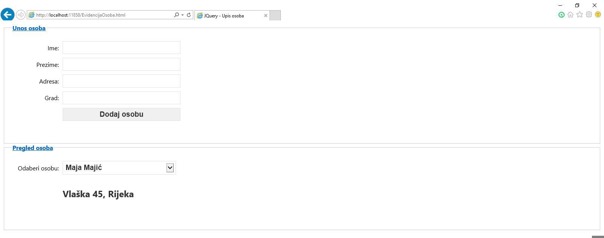
This HTML document includes a form for entering and reviewing personal details. It utilizes JavaScript for interactive elements like adding a person and displaying their details. The form fields include First Name, Last Name, Address, and City, and there's functionality to add and review the entered person's details.
Updated on:
Part of our complete: JQuery guide
Want exercises and real projects for this lesson? Get the full course.