Purpose of JavaScript
JavaScript is used to add interactivity to web applications and to extend their functionalities. The capabilities of JavaScript are endless, allowing, for example, the creation of games, button click responses, dynamic styling of elements, animation of elements, form validation, and more. It's a very compact yet highly flexible and powerful language. With the application of JavaScript, the web becomes alive and much more than just interlinked HTML documents.
Implementation of JavaScript
JavaScript can be implemented in an HTML document by writing the code within the <script></script> element or by writing the code in a separate .js file and referencing the file using the src attribute in the <script> tag.
The <script> tag tells the browser that the code between the tags should be interpreted as a script.
<script>
    JavaScript code
</script>
The <script> tag can accept two attributes:
- language – this attribute tells the web browser which scripting language to use. The value is most commonly javascript.
- type – this attribute tells the web browser which language is used and what the data format is.
<script language="javascript" type="text/javascript">
    JavaScript code
</script>
In newer versions of HTML, it is not necessary to specify the language and type attributes.
JavaScript is implemented by referencing an external .js file using the src attribute. If the src attribute is specified, no code should be within the <script></script> tags.
<script type="text/javascript" src="/scripts/functions.js"></script>
In the example below, the text "Hello World!!!" is output using JavaScript's built-in function document.write();. Also, two external JavaScript files are added.
The document.write(); function can output text or HTML or both.
<!DOCTYPE html>
<html lang="en">
  <head>
    <meta charset="utf-8" />
    <title>Adding JavaScript - Hello World</title>

    <!-- Referencing external scripts -->
	<script	type="text/javascript"
		src="http://code.jquery.com/jquery.js"></script>
  </head>
  <body>
    <h1>Implementing JavaScript in an HTML document</h1>
    <!-- Writing scripts within the <script> element -->
    <script>
      document.write("<h2>Hello World!!!</h2>");
    </script>

    <script>
      document.write("Hello World Again!!!");
    </script>

    <!-- Referencing external scripts -->
    <script type="text/javascript" src="/scripts/functions.js"></script>
  </body>
</html>
The HTML document is rendered using the so-called rendering engine component from the beginning to the end of the document. When the component comes to the <script> tag, all content afterwards is sent to the interpreter, which starts executing the JS code. After the closing </script> tag, the HTML continues to be rendered.
JavaScript code is usually written within the <head> or <body> elements, but for better loading of the HTML document, it is recommended to add it before the closing </body> tag.
JavaScript Syntax
JavaScript syntax is a specific set of rules that define a properly structured JS script. JavaScript is case-sensitive, which means that the names for variables, functions, objects, and the like must be written in a consistent manner. For example, the variable name "firstName" is not the same as "FirstName".
1.3.1. Naming Conventions
Variable and function names in JavaScript are most often written in so-called camel case, where the name begins with a lowercase letter, and words are separated by capitalizing the first letter of each subsequent word.
camelCase
While object names are most often written in the so-called pascal case, where the name is written with an uppercase initial letter and, similarly, words are separated by capitalizing the first letter of each subsequent word.
PascalCase
1.3.2. Whitespace, Tabs, and New Lines
Javascript ignores whitespace, tabs, and new lines that are found in JS scripts. You can use them at will and indent the code in a neat and consistent way for better readability and understanding.
1.3.3. Statements
Statements in JavaScript are written by separating them with a semicolon (;), as shown in the example below.
var firstNumber = 2;
var secondNumber = 3;
var sum = firstNumber + secondNumber;
Statements can consist of values, operators, expressions, keywords, and comments.
1.3.4. Comments
In JavaScript, there are single-line and multi-line comments. Single-line comments open with two forward slashes (//), and end when a new line is entered. Multiline comments open with a forward slash and asterisk (/*), and close with an asterisk and forward slash (*/). All content within /* */ characters is a comment and will not be rendered in the browser.
<script language="javascript" type="text/javascript">
    // Single-line comment

    /*
        Multi-line comment
    */
</script>
Debugging
Syntax errors often occur in programming that need to be corrected for the code to be executed. Since JavaScript is an interpreted language, errors can only be discovered when the code is executed, making them harder to find. In addition, most newer versions of web browsers will ignore errors and will not display them in the browser window.
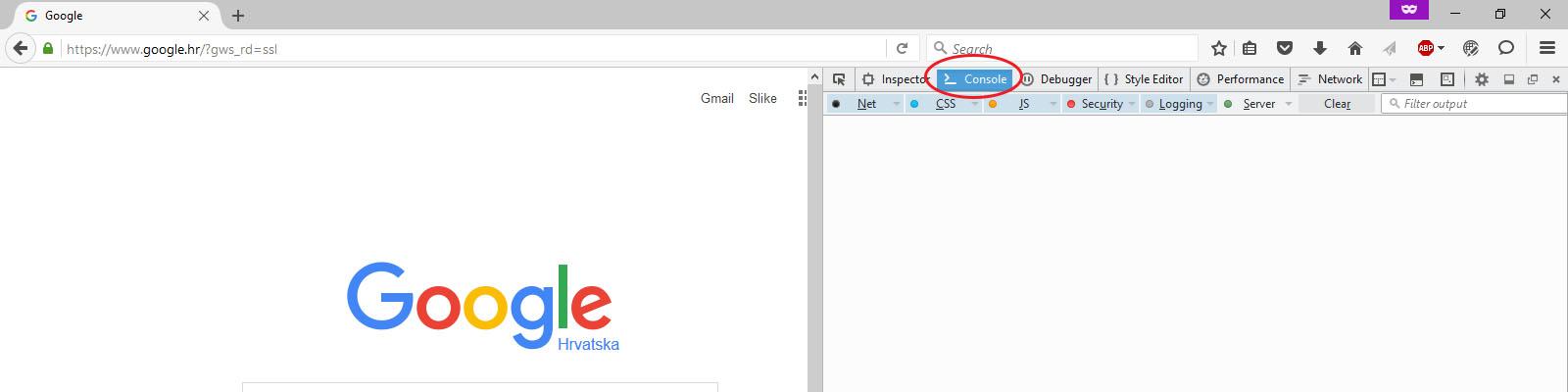
However, in all popular web browsers, you can get error information using the script console. To access the script console within most modern browsers, press F12 on your keyboard and open the "Console" tab.