Exercise: Building a UI Calculator
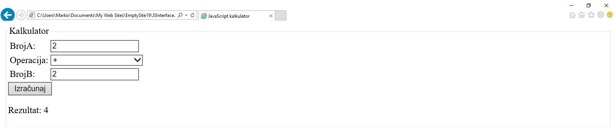
In the following example, the calculator from the second chapter is modified. In this case, numbers are entered in text fields, while the mathematical operation is selected from a drop-down menu.
By clicking on the "Calculate" button, the calculation is executed.
<!DOCTYPE html>
<html lang="en">
  <head>
    <meta charset="utf-8" />
    <title>JavaScript Calculator</title>
  </head>
  <body>
    <fieldset>
      <legend>Calculator</legend>
      <table>
        <tr>
          <td>
            <label for="NumberA">NumberA: </label>
          </td>
          <td>
            <input type="text" name="NumberA" id="numberA">
          </td>
        </tr>
        <tr>
          <td>
            <label>Operation: </label>
          </td>
          <td>
            <select id="calculationOperation">
              <option value="0" disabled selected hidden>--Calculation Operation--</option>
              <option value="+">+</option>
              <option value="-">-</option>
              <option value="*">*</option>
              <option value="/">/</option>
            </select>
          </td>
        </tr>
        <tr>
          <td>
            <label for="NumberB">NumberB: </label>
          </td>
          <td>
            <input type="text" name="NumberB" id="numberB">
          </td>
        </tr>
      </table>
      <button onclick="calculator()">Calculate</button>
      <p id="printResult"></p>
    </fieldset>
    <script>
      function calculator() {
      var numberA = parseInt(document.getElementById("numberA").value);
      var numberB = parseInt(document.getElementById("numberB").value);
      var calculationOperation = document.getElementById("calculationOperation");
      var selectedValue = calculationOperation.options[calculationOperation.selectedIndex].value;
      var print = document.getElementById("printResult");

      try {
        if (isNaN(numberA) || isNaN(numberB)) {
          throw "Numbers must be entered for the calculation operation!";
        }
        else {
          var result;
          switch (selectedValue) {
            case "+":
              result = numberA + numberB;
              print.innerHTML = "Result: " + result;
              break;
            case "-":
              result = numberA - numberB;
              print.innerHTML = "Result: " + result;
              break;
            case "*":
              result = numberA * numberB;
              print.innerHTML = "Result: " + result;
              break;
            case "/":
              result = numberA / numberB;
              print.innerHTML = "Result: " + result;
              break;
            default:
              throw "You have not entered a valid mathematical operation!";
          }
        }
      } catch (exception) {
        print.innerHTML  = "An error has occurred! Details: " + exception;
      } finally {
        alert("Thank you for participating!");
      }
      }
    </script>
  </body>
</html>
Updated on:
Part of our complete: JavaScript Fundamentals guide
Want exercises and real projects for this lesson? Get the full course.